
Devices
Devices is the authoritative inventory and health view.
Devices is the authoritative inventory and health view. Every device-centric workflow starts here: policy convergence, software context, event pivot, response, compliance, agent update and troubleshooting.
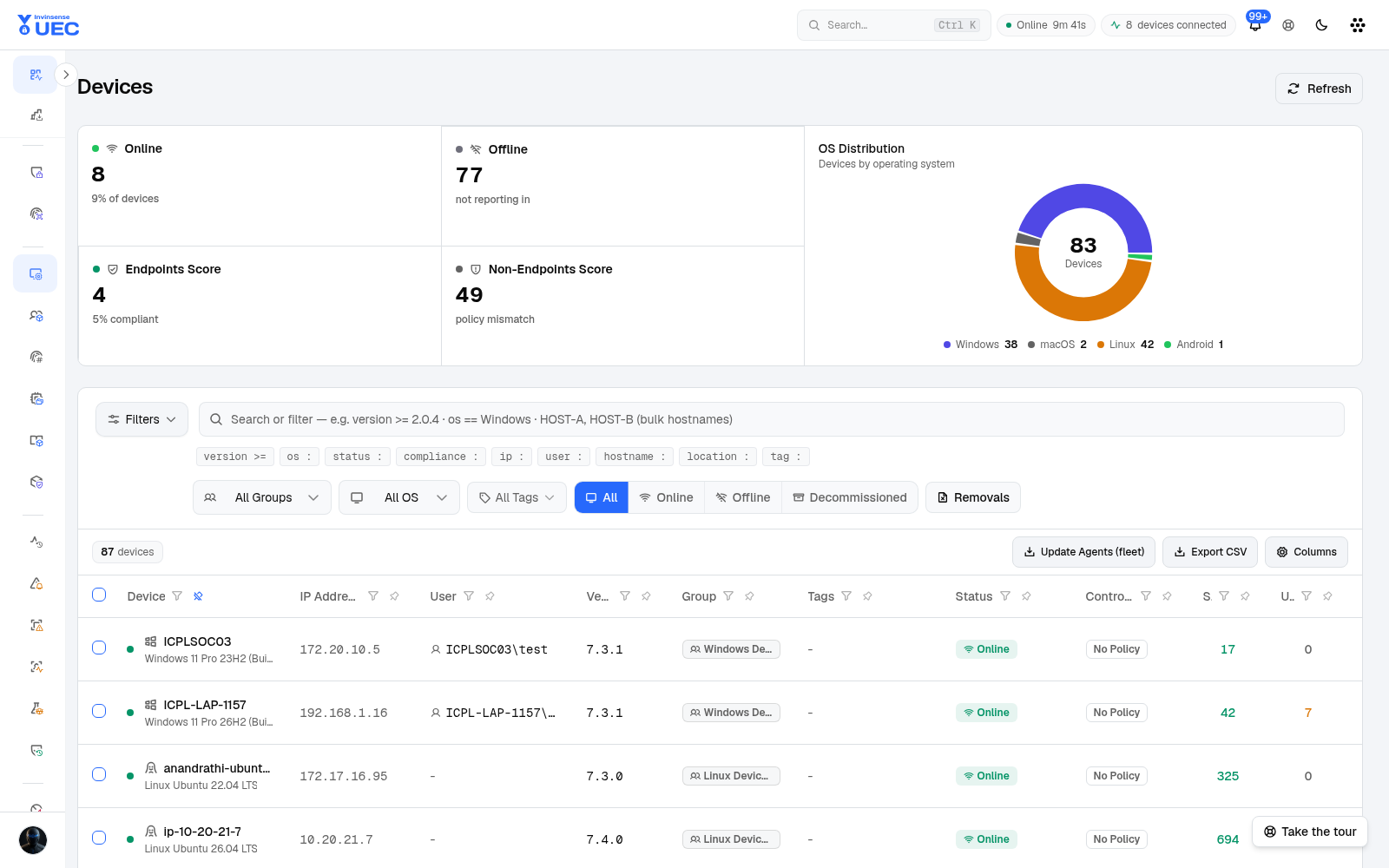
Fleet summary
Section titled “Fleet summary”| Tile | Meaning |
|---|---|
| Online | Devices reporting within the configured threshold |
| Offline | Devices not reporting in |
| Endpoints Score | Compliance-oriented endpoint score |
| Non-Endpoints Score | Devices outside endpoint policy expectations / mismatch |
| OS distribution | Windows, macOS, Linux, Android and other counts |
Each tile is a filter. Selecting Offline, for example, narrows the list rather than merely displaying a number.
Search and filters
Section titled “Search and filters”The device search box supports plain words, comma/space-separated hostnames for bulk lookup, and typed clauses:
| Clause | Example |
|---|---|
hostname: laptop-1157 |
Hostname contains the value |
hostname == RDX |
Exact hostname |
os: Windows |
OS family |
status: offline |
Reporting status |
version >= 7.3.1 |
Agent version threshold |
user: anubhavg |
Last signed-in user |
ip: 192.168.0. |
IP substring |
tag: ring-0 |
Tag |
compliance: pass |
Compliance result |
location: IN |
Location |
Group, OS and tag dropdowns combine with the query. The view selector switches All, Online, Offline, Decommissioned and removal requests, and the resulting state is shareable by URL.
Table columns
Section titled “Table columns”| Column | What to check |
|---|---|
| Device | Hostname and OS build |
| IP Address | Network location; useful for site-specific problems |
| User | Last reported user |
| Version | Agent version |
| Group | Base/supplement group membership affecting policy |
| Tags | Organisational labels; tags do not deploy policy |
| Status | Online/offline/decommissioned state |
| Control Mode | No policy, audit, enforce or platform control state |
| Signed / Unsigned | Observed counts; not a moral judgement by themselves |
| Last Seen | Reporting freshness |
| Action | Device-specific operations |
Use Columns to choose and pin fields. Column visibility and pinning persist in the browser, so an operator can build a stable working view.
Fleet operations
Section titled “Fleet operations”| Action | Use with care because |
|---|---|
| Update Agents (fleet) | It changes the endpoint agent version across many devices at once |
| Export CSV | Exports can contain device, user and network metadata |
| View removal requests | Uninstall/removal may reduce visibility and control |
| Refresh | Safe; reloads current data |
Start agent updates with a ring. Confirm the ring target, rate, drift and ETA before enabling it. See Agent deployment.
Device detail
Section titled “Device detail”Open a row to inspect:
- identity, OS, architecture and agent version;
- current group and tags;
- heartbeat and last seen;
- health/degraded reasons;
- control mode and applied policy state;
- software and file observations;
- events, alerts and response actions;
- artifacts, FIM and shipping configuration where applicable;
- upgrade or removal history.
The device Overview explains why a device is degraded — for example reduced collector mode, a clock jump or dropped kernel events — instead of showing only a red status.
Online, offline and health
Section titled “Online, offline and health”A device can be simultaneously connected and partially degraded. Read three layers separately:
- Transport: SignalR/API connection and heartbeat.
- Telemetry: configured streams are actually being collected and accepted.
- Control: agent downloaded and applied expected policy/control artifacts.
Agent Configuration controls channels and heartbeat/telemetry settings; Devices reports applied configuration and health.
Common workflows
Section titled “Common workflows”Investigate an offline burst
Section titled “Investigate an offline burst”- Filter
status: offline. - Group by OS, version, subnet or tag.
- Check whether the burst aligns with a network, agent update, policy change or platform incident.
- Open one representative device and read health state.
- If many devices went offline, use the notification Fleet row rather than resolving duplicate alerts one by one.
Find devices behind one version
Section titled “Find devices behind one version”version < 7.3.1 os: WindowsReview count, rings and owners before Update Agents (fleet).
Isolate policy mismatch to a group
Section titled “Isolate policy mismatch to a group”- Filter by base group.
- Compare Control Mode and agent version.
- Open Policies → Review assignments.
- Check applied policy identity on a representative device.
- Review Events for the policy-change window.
Privacy and safety
Section titled “Privacy and safety”- Export only the minimum device set needed by a ticket.
- Avoid pasting user, hostname and IP data into untrusted systems.
- Decommissioned devices should be handled consistently so old endpoints do not distort fleet score.
- Do not use tags as a substitute for policy groups.